FOR MICROSOFT DYNAMICS 365 USERS
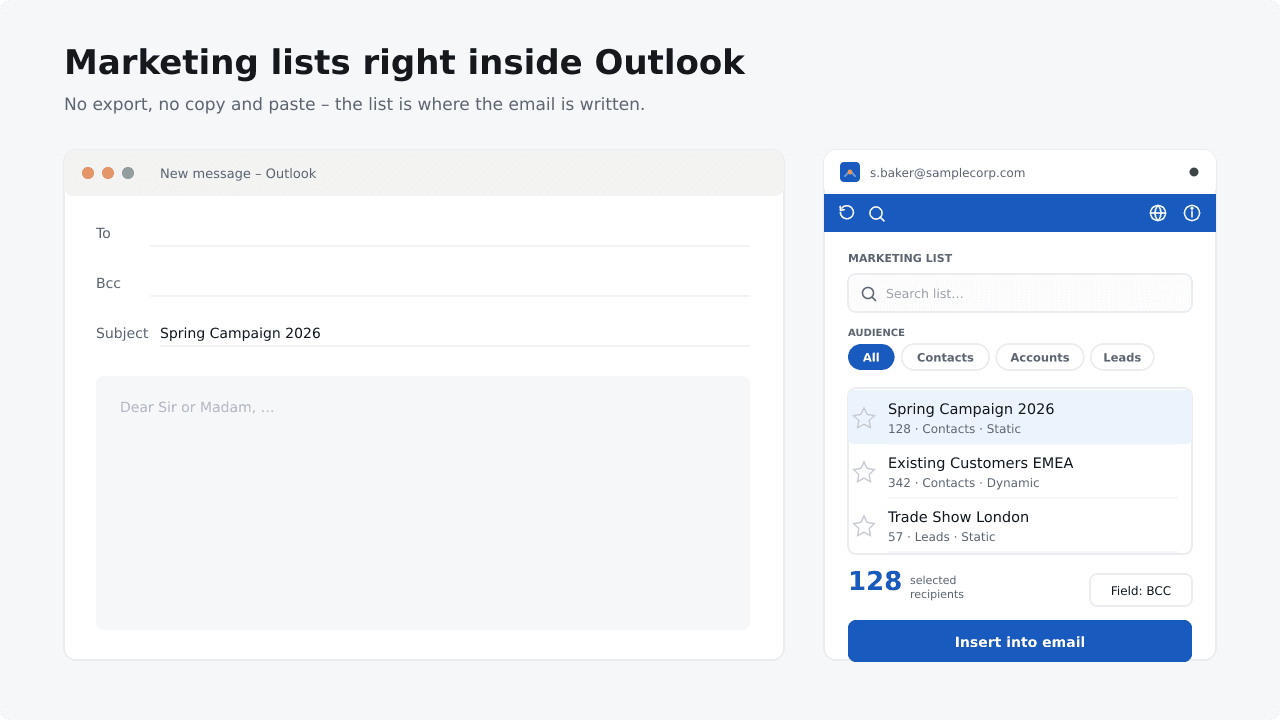
Pick a Dynamics 365 marketing list in Outlook, insert its recipients into your message and send. No Excel, no CSV.
No export. No copy & paste. No switching between applications.
€7.90–€14.90 / user / month · Volume pricing · Billed through Microsoft Marketplace
1 / 5
Why export a Dynamics 365 list to Excel first?
WITHOUT LIST2MAIL
Dynamics 365 → Export → Excel / CSV → Copy & Paste → Outlook → Clean up duplicates and formatting
WITH LIST2MAIL
Dynamics 365 → List2Mail in Outlook → Select list → Send email
Your contacts are already in Dynamics 365. List2Mail removes the extra export.
HOW IT WORKS
From Dynamics 365 to Outlook in three steps.
01
Select your list
Select your Dynamics 365 marketing list directly from the Outlook sidebar.
02
Add recipients
Choose To, Cc or Bcc and insert the list’s contacts, accounts or leads into your email.
03
Send
Write your message and send it through Outlook as usual.
BENEFITS
Your Dynamics 365 lists, right where you send your emails.
Search and filter
Find a marketing list by name, or filter by audience and owner.
Contacts, accounts or leads
Choose which audience type you want to email.
Static and dynamic lists
Work with both list types straight from the Outlook sidebar.
Favorites and recent lists
Mark lists you use often and get back to recent ones quickly.
To, Cc or Bcc
Decide in which field the recipients are inserted.
Recipient count at a glance
See how many recipients are selected before you insert them.
You want to email a Dynamics 365 list - not build a marketing campaign.
Your contacts are already in Dynamics 365. Why export them to Excel or set up a separate marketing workflow for a targeted email? With List2Mail, select the list in Outlook, add its recipients and send your message. For marketing automation or large-scale delivery, use a dedicated marketing service.
USE LIST2MAIL FOR
A targeted email to one marketing list, sent straight from Outlook.
USE A MARKETING SERVICE FOR
Marketing automation and large-scale delivery.
FOR IT
Easy for users. Straightforward for IT.
INSTALLATION
No extra software to install
List2Mail runs as an Outlook add-in. No additional desktop software or separate agent is required.
LIST DATA
Your CRM data stays out of our servers
Outlook connects directly to your Dynamics 365 environment. Lists and email addresses are never sent to or stored on our servers.
DATA ACCESS
Runs with the user’s own permissions
Delegated permissions only. Reads what the user can already see in Dynamics 365; list members load only for the list you pick.
Requirements & deployment
Microsoft 365 work or school accounts (Exchange Online). Outlook.com and Gmail accounts are not supported.
Outlook on the web, new Outlook for Windows and Outlook for Mac. Outlook mobile (iOS and Android) is not supported.
An environment with marketing lists. List2Mail detects your environment automatically.
Delegated permissions only: Dynamics 365 (user_impersonation), Microsoft Graph (User.Read) and access to the current Outlook email. No client secret, no app-only access.
Depending on your tenant settings, users consent themselves or an admin grants consent once for everyone.
Buy on Microsoft Marketplace, assign licenses in the Microsoft 365 admin center and deploy via Integrated apps.
Outlook allows up to 500 recipients per field (To, Cc or Bcc).
PRICING
Simple pricing. Lower prices for larger teams.
Solo
1 user
€14.90
per user / month
Team
2–5 users
€8.90
per user / month
Business
6–50 users
€7.90
per user / month
Get it on Microsoft Marketplace
All plans include the full List2Mail experience: Dynamics 365 marketing lists in Outlook · Search, filters and favorites · To, Cc or Bcc · Monthly subscription · Billed through Microsoft Marketplace
Choose the plan that matches your total number of licensed users. 1 user → €14.90 / month · 5 users → €44.50 / month · 20 users → €158.00 / month · 50 users → €395.00 / month. For more than 50 users we are happy to make you an individual offer. All prices are monthly and billed through Microsoft Marketplace. Applicable taxes or VAT may be added according to your location and Microsoft Marketplace billing rules.
Get List2Mail and start using your CRM lists directly in Outlook.
Get it on Microsoft Marketplace
€7.90–€14.90 / user / month · Volume pricing · Billed through Microsoft Marketplace